Nonprofit Web Design Guide 2026

The most effective nonprofit websites share four qualities: they load fast, tell a clear story, make giving easy, and work on any device. But getting those four things right takes intentional design, and in 2026, the bar is higher than ever.
In the age of the endless scroll, new information is constantly coming at you: Sarah had a baby, Blake just got into medical school, a new tech company is hiring for my role, the Dow just dropped 200 points, the Patels are traveling to Rome, a billionaire is building another spaceship, a local nonprofit needs donations for a housing initiative…
Eventually the scrolling stops, and someone clicks on your website. You’ve got precious seconds to hold their attention and steer them toward taking action.
That’s why your website is the lynchpin of your nonprofit’s digital marketing strategy. It’s the building that’s always open to visitors: the first stop when people consider investing time, energy, and money in your organization. Effective nonprofit web design needs to tell a story and share what matters most to your audience and your mission.
But is your website telling a story, or is it an info dump? Is it easy to navigate or overwhelming? Are you using your content strategy to engage visitors and build strong virtual connections? Are you building organic traffic and ranking on search engines?
A nonprofit set on growth needs an intelligent nonprofit website to get there.

We’ve got some ideas for you.
What Should a Nonprofit Website Look Like?
The best nonprofit websites combine clear storytelling, intuitive navigation, accessible design, and a donation experience that removes every unnecessary obstacle between a visitor and a gift. Before we look at some examples, let’s review the essential elements of high-quality nonprofit web design.
It should tell your story quickly.
According to 2026 web traffic data, mobile users typically spend 1.5 to 3.5 minutes per visit, while desktop users average 2.5 to 5 minutes. That’s why when designing your online presence—and especially your About page—you want to ensure your organization’s mission is as straightforward as possible. Clear, unambiguous headlines, photos, and other media will tell this story before new visitors start reading.
It should integrate your social media.
The more ways people can follow your organization, the better. Link your social media accounts (and link back to your webpage) to make the transition as smooth as possible. Another way to smooth that transition is…
It should be consistent with branding.
Use consistent logos, fonts, colors, and other eye-catching graphic design elements across social media platforms. Brand identity consistency leads to trust. It reassures your users that you are who you say you are wherever they encounter you online.
It should show people who you work with.
In an era of AI-generated content, authenticity is your greatest asset. To bolster your credibility, include testimonials from people you’ve helped or organizations you’ve partnered with. People are naturally more hesitant to trust online sources, so it’s important to provide sources and evidence that demonstrate who you are and what you do. Add security badges to your donation forms and donation pages.
It should use negative space.
Above all, keep your website’s navigation straightforward, clear, and intuitive. Sometimes, that means more information, but often, it means less. Don’t overload your navigation bar with too many options; don’t pile on text that’ll slow down visitors before they even get to your call to action.
It should provide multiple ways to engage.
Donations are critical, but don’t let the push for donations obscure the other ways visitors can get involved. Encourage users to ask questions, sign up for a newsletter, follow you on social media, or volunteer sign-ups. Not everyone will be ready to donate right away, but if you offer other ways to get involved, you’ll be top of mind when they are. People who aren’t ready to open their wallets today might become your biggest champions tomorrow.
It should streamline your donation page.
Once visitors click your CTA, make sure they don’t get confused or bogged down on your donation page. Keep things clear and straightforward. If they’re directed away from your website to a third party, include elements of your branding to maintain consistency. The 2026 benchmark is a donation form that can be completed in under two minutes on a mobile device, with no friction.

How AI is Reshaping Nonprofit Web Design in 2026
Artificial intelligence is transforming how nonprofits interact with supporters. Organizations must integrate these tools responsibly to maintain trust.
- Ethical AI Use: Clearly label AI-powered chatbots. Give users the option to speak with a real human or opt out of AI interactions entirely.
- Personalized Donor Journeys: AI tools now analyze past giving behaviors to dynamically suggest specific, contextual donation amounts for individual users.
- Smart Accessibility: Automated AI widgets can continuously monitor your website to help maintain strict compliance with updated web accessibility guidelines.
- AI Overviews and Organic Search: Google’s AI Overviews now appear on many nonprofit-adjacent search queries, generating answers directly on the results page before a user visits any website. Nonprofits that structure their content clearly—with direct answers, question-based headers, and comprehensive FAQ sections—are more likely to be cited in AI Overviews and earn the click when a user wants to learn more. This is an increasingly important consideration for your SEO and content strategy.
Nonprofit Web Design Best Practices
The strongest nonprofit websites are built around three principles: accessibility for every user, clarity for every visitor, and conversion paths that make giving and getting involved as frictionless as possible. Creating an impactful nonprofit website goes beyond aesthetics. It’s about storytelling, web accessibility, and functionality. Nonprofit web design requires a unique approach that prioritizes mobile optimization, ADA compliance, and an engaging user experience. These elements ensure that your website is not just visually stunning but also accessible and easy to use.
1. Accessibility and ADA Compliance
We bake web accessibility into the design process from day one. Implement features such as screen reader compatibility and keyboard navigation to meet the WCAG 2.2 standards, which remain the current legal compliance benchmark as of 2026. WCAG 3.0 is in Working Draft status, with a final recommendation expected around 2028–2030. Forward-planning organizations should be aware of it, but WCAG 2.2 Level AA is the current standard for audits, remediation, and compliance planning. An accessible website respects every user’s right to access information.
2. Mobile Responsiveness
More than half of your web traffic arrives via mobile. Responsive design enhances user experience. Google’s Core Web Vitals directly affect your search ranking, meaning a slow, clunky mobile website makes you virtually invisible. With 60% of global web sessions coming from mobile devices in 2026, mobile optimization is not a nice-to-have.
3. User-centric Design
Prioritize a user-centric approach by understanding your audience’s needs. Create intuitive navigation, clear calls to action, and engaging content that resonates with visitors and encourages them to explore further. Use GA4 to understand how users move through your site, which pages take the most time, and where visitors drop off before converting.
4. Streamlined Donation Pages
Simplify the donation process with user-friendly forms and secure payment gateways. Display suggested donation amounts with specific context (e.g., “$25 provides meals for a family”) to guide contributors and offer multiple payment options for convenience.
5. Impactful Storytelling
Use compelling narratives, visuals, and illustrations to connect emotionally with your audience. Highlight success stories, testimonials, and real-life examples to demonstrate the impact of their support.
6. Interactive User Journeys
Design user journeys that encourage exploration and engagement. Incorporate interactive elements like quizzes, surveys, and multimedia content to captivate your audience and drive action.
Examples of the Best Nonprofit Websites
The best nonprofit websites make a visitor feel something within the first ten seconds. Let’s look at high-performing nonprofit web design projects to understand what makes them stand out.
Metropolitan Ministries
Consider the website for one of our clients, the Tampa Bay nonprofit Metropolitan Ministries. The homepage is clear and dynamic, incorporating a looped video of volunteers at a food bank. This vividly displays what the organization does—helping poor and at-risk families with food and housing assistance—before you’ve even read a word.
The banner, “Become a Bridge Builder,” evokes optimism and shares the location. Three large highlighted statistics on the page provide proof of the good the organization does. Two clearly marked, interactive CTAs at the top of the page (“Donate Once” and “Donate Monthly”) encourage visitors to take action right away and even invite recurring donations.

Girls Who Code
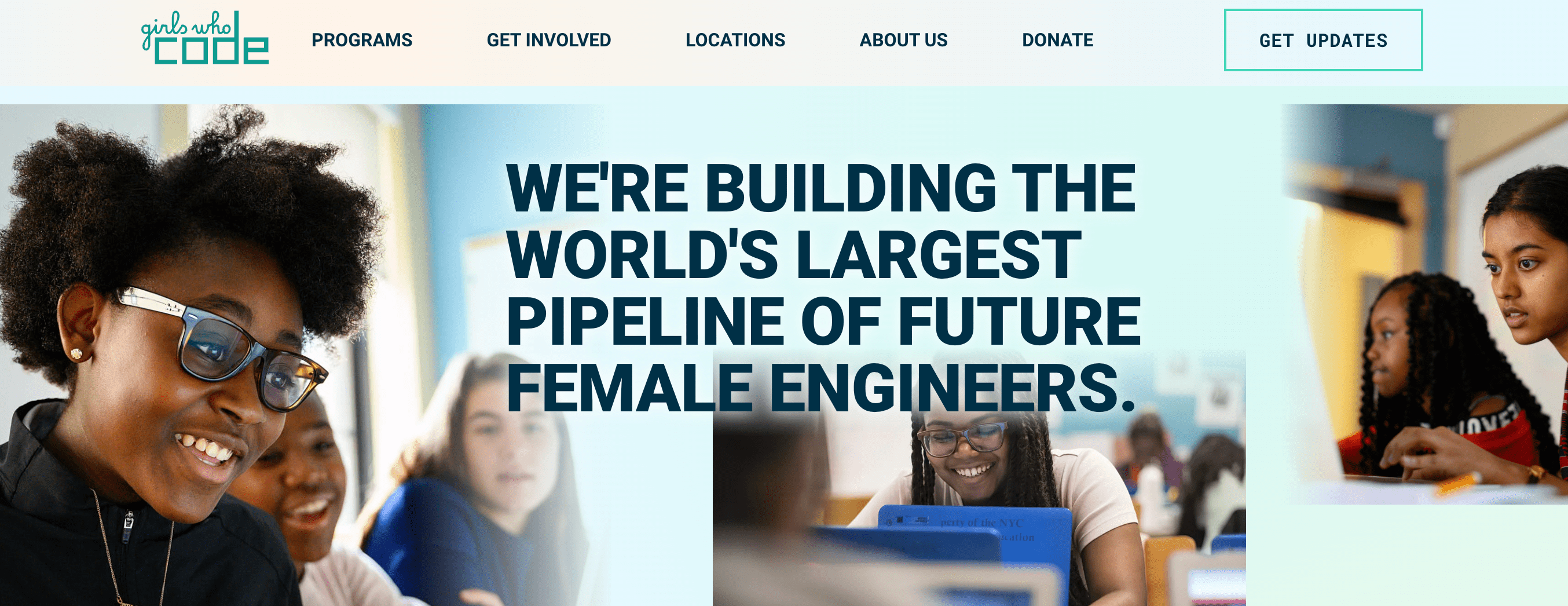
Another nonprofit page to consider is Girls Who Code, an organization dedicated to promoting greater racial and gender diversity in computing and the tech industry. The hero banner on their homepage clearly states what they do, and it’s paired with engaging close-up photos of the people they serve.
The website’s top menu provides clear drop-down menus with more information about the organization’s identity, activities, and opportunities to get involved and stay informed. As you scroll down the page, icons and short, carefully worded descriptions explain their programs, show where they’re active worldwide, and list the prominent organizations they work with to build credibility with new users.
charity: water
charity: water’s website excels in transparency and storytelling. At the core of its success is the seamless blend of impactful narratives and striking visuals that vividly illustrate the real-world impact of its efforts. One unique feature of their site is a detailed progress-monitoring tool that lets donors track how their contributions are used. This transparency builds trust and satisfies contributors’ desire to see the impact of their donations.
The design of charity: water’s website is clean and intuitive. Its well-organized content effortlessly guides visitors through its mission. The website uses an innovative “Storytelling” approach, prominently featuring beneficiaries’ personal stories and making the cause relatable and urgent to supporters worldwide.

Building Your Nonprofit Website: A Step-by-Step Guide
A successful nonprofit website redesign starts long before a designer opens a file. Organizations that invest time in research, goal-setting, and content architecture before website development begins consistently produce better results and avoid costly mid-project pivots.
Whether you’re starting a new website or revamping an existing one, these steps will help you build a solid digital presence that informs and inspires action.
1. Understand your target audience.
Conduct audience research to identify user preferences and pain points. Use surveys, interviews, and analytics to gather insights about your website’s design and content strategy.
2. Set clear objectives.
Define your website’s goals, whether it’s fundraising by driving users to your donation form, increasing volunteer sign-ups, or raising awareness. Clearly outline these objectives to guide your brand design and content decisions.
3. Create a sitemap and wireframes.
Create a sitemap to organize your website’s structure and layout. Develop wireframes to visualize page layouts on your nonprofit site, ensuring intuitive navigation and content flow.
4. Focus on brand identity and visuals.
Maintain consistent branding across your website, using cohesive colors, fonts, logos, and illustrations. A solid brand identity reinforces trust and recognition. This work also feeds your marketing materials and should be consistent across every channel.
5. Create real content.
Develop engaging and informative content that aligns with your mission. Use clear headlines, compelling visuals, and concise copy to convey your message effectively. This is also the phase where keyword research should inform your page titles, headers, and metadata.
6. Implement web development and testing.
Choose a reliable content management system (CMS)—like WordPress, HubSpot’s Content Hub (formerly CMS Hub), or Drupal—for flexibility and ease of use. Implement robust testing for functionality, usability, and performance before launch. Plan your website maintenance at this stage.
Meeting Your Unique Nonprofit’s Needs
Nonprofits face a set of web challenges most commercial websites don’t, from volunteer management, event registration, fundraising campaigns, membership programs, and impact reporting all running alongside the core marketing function. These organizations need websites that inform and engage supporters while efficiently facilitating donations, volunteer sign-ups, and advocacy efforts.
Donation Platforms and CRM Integration
Seamlessly integrate donation platforms and CRM systems for efficient digital strategy and digital marketing execution. CRM integration streamlines operations and enhances donor engagement. Blackbaud, HubSpot, and Bloomerang are among the most common CRM platforms nonprofits integrate with their websites.
Event Calendars and Registration
Showcase upcoming events with user-friendly calendars and registration forms. Provide easy access to event details and encourage participation.
Volunteer Sign-ups and Management
Facilitate volunteer engagement with convenient sign-up forms and email marketing management tools. Streamline communication and coordination for a seamless volunteer experience.
Impact Metrics and Reports
Share transparent impact metrics and reports to demonstrate accountability and effectiveness. Highlight your organization’s achievements and future goals to build trust.
Mission-driven Design
Add mission-driven design elements that reflect your organization’s values. Use visuals, colors, and messaging that resonate with your audience.
Engaging Multimedia Content
Incorporate videos, infographics, and interactive media to enhance storytelling. Visual content captures attention and communicates complex messages effectively.
SEO and Performance Optimization for Nonprofits
A nonprofit website that ranks well earns a sustained pipeline of potential donors, volunteers, and advocates without recurring ad spend. Search engine optimization is how you protect and grow that pipeline over time.
SEO Best Practices
Implement SEO strategies to improve search engine visibility. Optimize your content for search engine optimization using relevant keywords from keyword research, meta tags, and alt text. Write title tags and meta descriptions for every page because these are the primary signals that determine whether a searcher clicks your result over a competitor’s. This is also called metadata and is often overlooked during website redesign projects.
Improving Website Speed
Optimize images, reduce server response time, and leverage browser caching to enhance site speed. A fast-loading website improves user experience and boosts SEO.
Schema Markup and Structured Data
Utilize schema.org markup to enhance search engine results. Structured data gives search engines additional context, improving visibility and click-through rates. Schema markup is also increasingly relevant for AI Overviews. Well-structured FAQ, Article, and Organization schema makes your content easier for Google to extract and cite.
Intuitive Navigation and Usability
Simplify navigation with a clear menu structure and intuitive layout. Make essential information and resources easy to access.
Accessible and Readable Content
Use readable fonts, ample spacing, and contrast to enhance readability. Ensure content is accessible to all users, including those with disabilities.
Engaging Calls to Action
Craft compelling calls to action that prompt users to take desired actions. Use action-oriented language and strategically place CTAs throughout your website.
Create a Resource Hub
Developing a comprehensive resource hub on your nonprofit website creates a central repository of valuable information and tools that support your mission. By curating a wide range of resources—from guides and toolkits to case studies and FAQs—you empower visitors with the knowledge they need to engage more deeply with your cause. A well-organized resource hub can strengthen your organization’s reputation as a thought leader and foster a strong sense of community among supporters, volunteers, and donors.
Offer downloadable guides and toolkits to support nonprofit organizations. Provide practical resources that address common challenges and opportunities. Publish informative articles and blog posts that cover relevant topics and industry trends. Share insights and expertise to establish authority and thought leadership. Curate a list of external resources and links that provide additional value and direct users to trusted sources for further learning and exploration.
How Much Should a Nonprofit Website Cost?
Nonprofit website costs vary enormously based on complexity, custom functionality, and whether you’re building in-house or with an agency. The range below is a starting point. Your actual cost depends on your organization’s goals, page count, and technical requirements.
Web design is essential, competitive, and technical, which can translate to “pretty expensive,” depending on the website’s complexity and sophistication.
But the investment is worth it. That’s because it’s more necessary than ever to ensure that your website’s technical features, such as page speed and user experience, are optimized for Google, mobile, and individual audience members. Responsiveness, speed, and personalization are key to a successful website, and they require expertise. For example, your website may have exciting and interesting features, but if they don’t also load quickly, you’re out of luck.
Forbes estimates that web design for small businesses or corporate websites can cost anywhere from a couple thousand to $50,000, with ongoing costs like hosting and apps typically adding $15 to $150 per month. It really depends on what you’re looking for and how custom you want your website to be.
If you’re trying to design a website using an online website builder like Wix or Squarespace, the price is relatively accessible. Wix plans start at $24/month and Squarespace at $25/month, which is a manageable starting point for very small organizations. Most website builders charge recurring monthly or annual fees. These platforms offer pre-made templates that work in a pinch if you’re not looking for anything complicated, though you’ll have limited flexibility for custom web development without technical skills.
HubSpot’s Content Hub (formerly CMS Hub) lets you build your nonprofit website with a drag-and-drop builder and provides ongoing content management system features, including search engine optimization, analytics, and CRM integration, all in one platform.
Should I Hire a Nonprofit Web Design Agency?
For most nonprofits, working with a specialized nonprofit web design agency delivers measurably better results than a DIY build or a generalist agency that hasn’t navigated the sector’s specific constraints. Depending on the functionality and optimization you need, working with a marketing agency may be your best option.
A website redesign can cost anywhere from $15,000 to $30,000, or $40,000–$70,000 for a website with a high page count and advanced custom web development. Working with a nonprofit web design agency means you’ll have a team of seasoned experts evaluating and optimizing everything: SEO, page speed, content creation, user experience, web accessibility, and conversion rate optimization.
Agencies that specialize specifically in nonprofits (like Big Sea!) understand the unique constraints of mission-driven organizations: board oversight, limited internal capacity, budget cycles that don’t always align with project timelines, and the specific integration needs of CMS platforms. Generalist agencies often apply commercial web development approaches that don’t translate well to the nonprofit context.
Choose a Nonprofit Web Design Agency that Understands Your Values
At Big Sea, we value the work of nonprofits. We’ve partnered with many nonprofit organizations—from grassroots community programs to cultural organizations to big national brands—to expand their reach online through our web design services and advertising.
Look at our results; we want to help you achieve the same. Contact us today to find out how our strategists can solve problems for your organization.



